XBRL — A Study in Resurrection
At my company, we outsourced a module called XBRL to a vendor. XBRL — eXtensible Business Reporting Language — is the XML-based format regulators require for financial filings; the module wraps the whole flow of preparing, validating, and submitting those reports. We were short on manpower, the deadline was closing in, and the higher-ups gave the vendor “freedom” to run their own research, talk directly to our client, file bi-weekly reports, and ship the whole thing end-to-end in three months.
We thought all was going well.
It was not.
Month one looked fine. Things drifted in the back half of month two — the backend stayed on track, the frontend hit turbulence. The vendor blamed an internal dispute, but the code told its own story: a lot of it ignored our standards, and some features didn’t match the spec. The higher-ups extended the benefit of the doubt; the vendor hadn’t run away or given up, so we let them continue.
By the end of month three they hadn’t delivered. The features that did exist were buggy, almost unusable, and even the main flow was unfinished. The client’s deadline hadn’t moved.
Enter: the magician — me.
Assessing Damages
I had no prior knowledge of the module by the time I was asked to fix it. I might as well have been asked to fix something that never existed.
So aside from reading their code and getting the design files, I asked for a thorough run-through of the module. What exactly did this module do? What was its purpose? What were users supposed to do here, and what did they expect to walk away with by the end? I asked for the technical specifications, and had to make peace with the fact that there was no written documentation to refer to.
From there, it became a series of reading code and back-to-back sessions with the PM and the backend developer who wrote the APIs. The code, as suspected, didn’t follow our standardization, and most of the approaches were more complex than they needed to be. That unnecessary complexity was the root of the buggy behaviour. A few patterns kept turning up:
useEffectdoing work that didn’t call for it, causing unpredictable side effects throughout the UI.- No TanStack Query — async state was hand-rolled, while every other module in the system used Query.
- No Zod schema validation, so nothing at the boundary.
- Inconsistent naming, scattered constants and configs, duplications everywhere.
Each problem compounded the next.
At first, I tried to salvage parts. I was working against a one-week deadline, after all. But every fix cracked something else open. It was the very classic problem with legacy code: more time was spent just trying to understand it than actually fixing it. And time was not on my side. The decision to rewrite from scratch came when I realized I now fully understood what the module was supposed to do, had clear enough requirements to start fresh, and had a cooperative backend developer I could rely on for the API details.
With that, I set aside what the vendor had built — with the PM’s permission — and started from zero.
The Approach
I started where I always start when the ground isn’t solid: the data.
Before writing a single line of UI, I sat down to define the schemas — what the data table needed, what the detail view needed (they were different), what options had to be fetched from the API, how attachments were structured, and what shape the data needed to take when sent back to the server. This included defining the enums as part of the schema — statuses in particular, since the vendor had left them typed as plain strings with no mapping of what values actually existed or what they meant. Since there was no documentation to reference, all of this was done in close coordination with the backend developer, clarifying field by field what the API actually expected and what it would return.
With the data layer in place, I moved to the UI and logic. This meant defining page-level permissions based on status, mapping out which workflows were allowed at each stage, and building the interaction patterns around those rules. API integration happened in parallel throughout this phase, testing each workflow end-to-end as it was built rather than leaving it all to the end.
The module came in three flavours, scoped to different user roles: xbrl-reporting for the internal reporting team, xbrl-management for the oversight team, and emiten-xbrl-reporting for the issuer. I built xbrl-reporting first because it was the hardest. Once it was done, the other two — sharing the same underlying data and business logic, essentially different views of the same entity — came together much faster.
What I Built
The XBRL module came down to three critical pieces:
The Workflow Engine
The XBRL submission process has 15 different statuses. That number alone isn’t the problem — the problem is that every status carries its own set of rules about what a user can and cannot do. Whether a submission can be edited, corrected, resubmitted, or voided depends entirely on where it sits in the workflow. Get it wrong and users either hit silent failures or, worse, perform actions they shouldn’t be able to.
The vendor had handled this with scattered conditionals throughout the UI — checks duplicated across components, statuses compared as raw strings, no single source of truth. It was fragile and impossible to reason about.
The fix started at the data layer. Rather than a TypeScript enum, I defined the statuses as a const array with as const, letting TypeScript infer the exact string literals as a union type. Zod could then validate against them directly with z.enum(XBRL_STATUS) — meaning the schema and the type stayed in sync automatically from a single source of truth.
const XBRL_STATUS = [
  "initiateSuccess",
  "initiateOnProcess",
  "initiateFail",
  "onProgressFinalSubmit",
  "onProgressFinalSubmitCorr",
  "onProcessUpload",
  "onProgressValidation",
  "failedUpload",
  "submitted",
  "fail",
  "valid",
  "voidState",
  "successUpload",
  "correction",
  "save",
] as const;

// Type is inferred automatically — no duplication
type XbrlStatus = (typeof XBRL_STATUS)[number];

// Zod validation uses the same array as the single source of truth
const xbrlStatusSchema = z.enum(XBRL_STATUS);
Permissions were derived from that same foundation. For each action, I defined which statuses blocked it — and used typedIncludes, a type-safe helper I had previously contributed to the codebase, to check whether the current status was in that list. If it was, the action was unavailable. If not, it was allowed. Simple, readable, and easy to update when business rules changed — which they do.
const canEdit =
  isEdit &&
  !typedIncludes(
    [
      "initiateFail",
      "initiateOnProcess",
      "onProgressFinalSubmit",
      "onProgressFinalSubmitCorr",
      "submitted",
      "voidState",
    ],
    xbrlReporting.status_validation,
  );
The Multi-Step Form
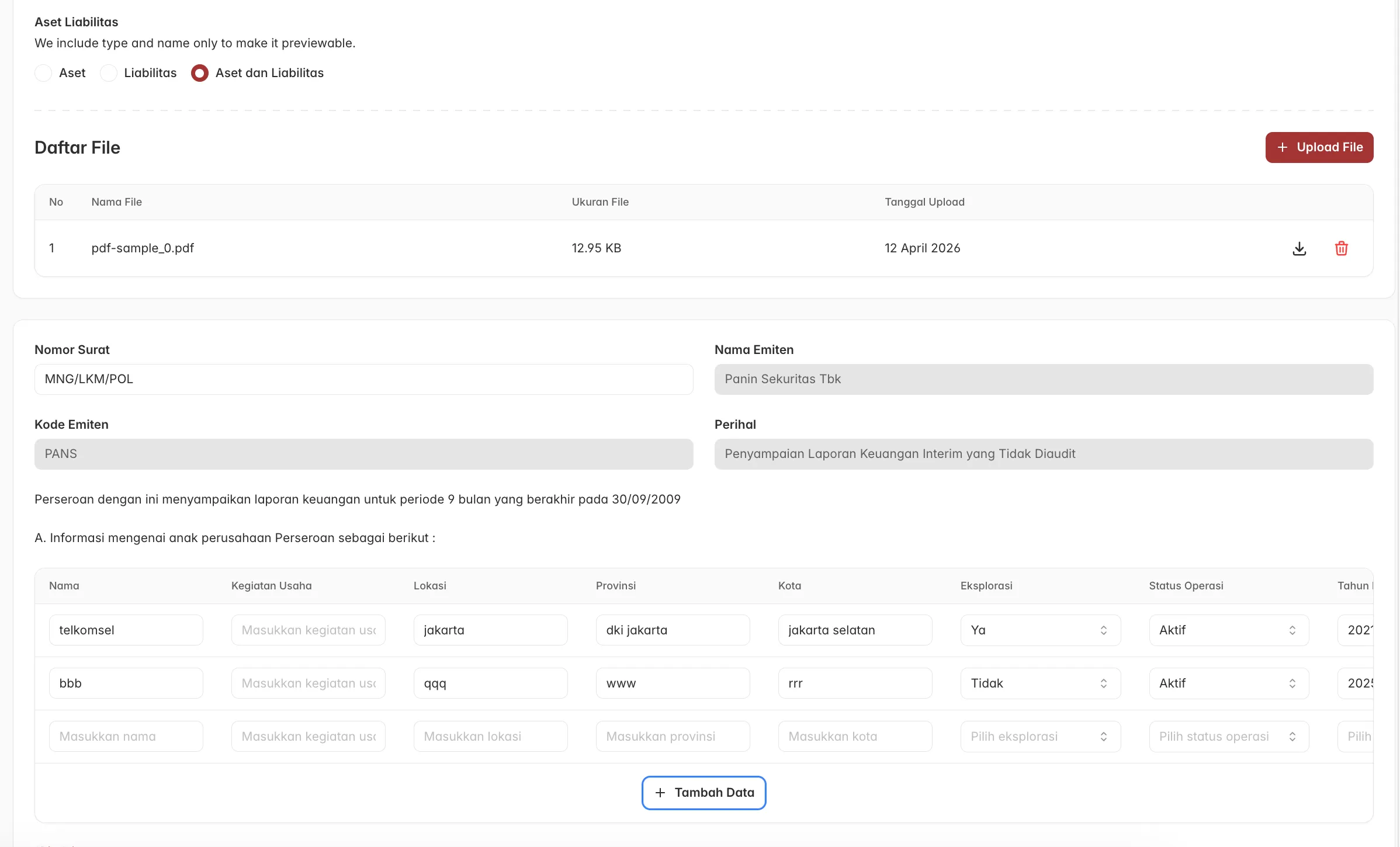
The submission creation flow spans four steps: issuer information, XBRL details, a cover letter with subsidiary data, and the financial forms. Each step has its own complexity, but three stood out as genuine engineering problems.
Cross-field validation
The XBRL details step has 20+ fields, and many of them don’t behave independently. Which fields are required shifts based on what the user has already selected. The clearest example: if the financial statement is marked as audited, a whole group of auditor fields become required. If it’s unaudited, they disappear entirely.
My first attempt was superRefine, Zod’s standard tool for cross-field validation. It didn’t behave as expected — the issue is that Zod can abort early when individual fields fail their own validation, meaning the cross-field logic sometimes never ran at all. Working through why it failed led me to z.preprocess, which runs before the main schema parses anything. Inside the preprocessor, I used .pick() and .safeParse() to carefully extract just the fields involved in cross-field logic, added the conditional issues to ctx, then returned the original input untouched so the rest of the schema could continue normally. The cross-field validation now always runs, regardless of what the individual fields do.
export const storeXbrlReportingInformationSchema = z.preprocess((input, ctx) => {
  // Safely extract only the fields involved in cross-field validation
  const parsed = storeXbrlReportingInformationBaseSchema
    .pick({
      kind_of_financial_statement: true,
      type_of_auditors_opinion: true,
      date_of_auditors_opinion: true,
      name_of_current_year_audit_signing_partner: true,
      name_of_prior_year_audit_signing_partner: true,
      prior_year_auditor: true,
    })
    .safeParse(input);

  if (parsed.success) {
    const { kind_of_financial_statement, type_of_auditors_opinion } = parsed.data;

    // Auditor opinion is required when statement is audited
    if (kind_of_financial_statement === "Diaudit / Audited" && !type_of_auditors_opinion) {
      ctx.addIssue({
        code: "custom",
        message: "Field ini wajib diisi.",
        path: ["type_of_auditors_opinion"],
      });
    }

    // These fields are required for any non-unaudited statement
    if (kind_of_financial_statement !== "Tidak Diaudit / Unaudit") {
      const requiredFields = [
        "date_of_auditors_opinion",
        "name_of_current_year_audit_signing_partner",
        "name_of_prior_year_audit_signing_partner",
        "prior_year_auditor",
      ] as const;

      for (const field of requiredFields) {
        if (!parsed.data[field]) {
          ctx.addIssue({
            code: "custom",
            message: "Field ini wajib diisi.",
            path: [field],
          });
        }
      }
    }
  }

  // Pass through the original input untouched
  return input;
}, storeXbrlReportingInformationBaseSchema);
Data-driven field rendering
Managing 20+ fields with complex interdependencies — which fields are parents of which, which values trigger which children to appear, which fields auto-calculate when their dependencies are filled — would have gotten messy fast if written imperatively. Instead, I defined the fields as a data structure. Each field declaration carries its own metadata: its label, its parentOf list (fields it controls), its partOf list (fields it depends on), and a partOfChoice array specifying exactly which values of the parent field make it visible.
const formFields = [
  {
    // parentOf: changing this field resets all its children
    id: generateRandomId(),
    label: "Industri Utama Entitas",
    subLabel: "Entry Point",
    name: "entrypoint" as fieldName,
    parentOf: [
      "dei_form_code",
      "fp_form_code",
      "ci_form_code",
      "ce_form_code",
      "cf_form_code",
      "calk_form_codes",
    ] as fieldName[],
    FieldElement: ComboboxStatementOptions,
  },
  {
    // parentOf: changing this field conditionally updates auditor fields
    id: generateRandomId(),
    label: "Jenis Laporan Atas Laporan Keuangan",
    subLabel: "Type of Report on Financial Statements",
    name: "kind_of_financial_statement" as fieldName,
    parentOf: [
      "type_of_auditors_opinion",
      "date_of_auditors_opinion",
      "current_year_auditor",
      "name_of_current_year_audit_signing_partner",
      "prior_year_auditor",
      "name_of_prior_year_audit_signing_partner",
    ] as fieldName[],
    FieldElement: ...,
  },
  {
    // partOf + partOfChoice: only rendered when parent has a specific value
    id: generateRandomId(),
    label: "Jenis Opini Auditor",
    subLabel: "Type of Auditor's Opinion",
    name: "type_of_auditors_opinion" as fieldName,
    partOf: ["kind_of_financial_statement"] as fieldName[],
    partOfChoice: ["Diaudit / Audited"] as string[],
    FieldElement: ...,
  },
];
The renderer maps over that array and derives show/hide logic and cascade updates directly from the metadata, keeping the rendering logic clean and the field relationships easy to read and change in one place.
{
  formFields.map((formField, idx) => {
    // Determine visibility: hide this field if its parent exists
    // but the parent's current value isn't in partOfChoice
    const hidePartOfChoice =
      formField.partOf !== undefined &&
      formField.partOfChoice !== undefined &&
      formField.partOf.every((parent) => !formField.partOfChoice.includes(values[parent]));

    if (hidePartOfChoice) return null;

    return (
      <formField.FieldElement
        name={formField.name}
        value={values[formField.name]}
        onValueChange={(value) => {
          const baseUpdate = { [formField.name]: value ?? "" };
          const updatedValues = { ...values, ...baseUpdate };

          // Each helper is responsible for one type of cascade update
          const entrypointUpdates = getEntrypointUpdates(formField);
          const financialStatementUpdates = getFinancialStatementUpdates(
            formField,
            updatedValues,
            issuer,
          );
          const periodDatesUpdates = getPeriodDatesUpdates(formField, updatedValues, values);

          // Merge all updates and apply in one shot
          bulkUpdate({
            ...values,
            ...baseUpdate,
            ...entrypointUpdates,
            ...financialStatementUpdates,
            ...periodDatesUpdates,
          });
        }}
      />
    );
  });
}
XML form rendering and state preservation
The fourth step — the financial forms — presented a different kind of problem entirely. The backend delivers these forms as base64-encoded HTML, not structured data. They can’t be parsed into React components; they have to be decoded and injected directly into the DOM via innerHTML.
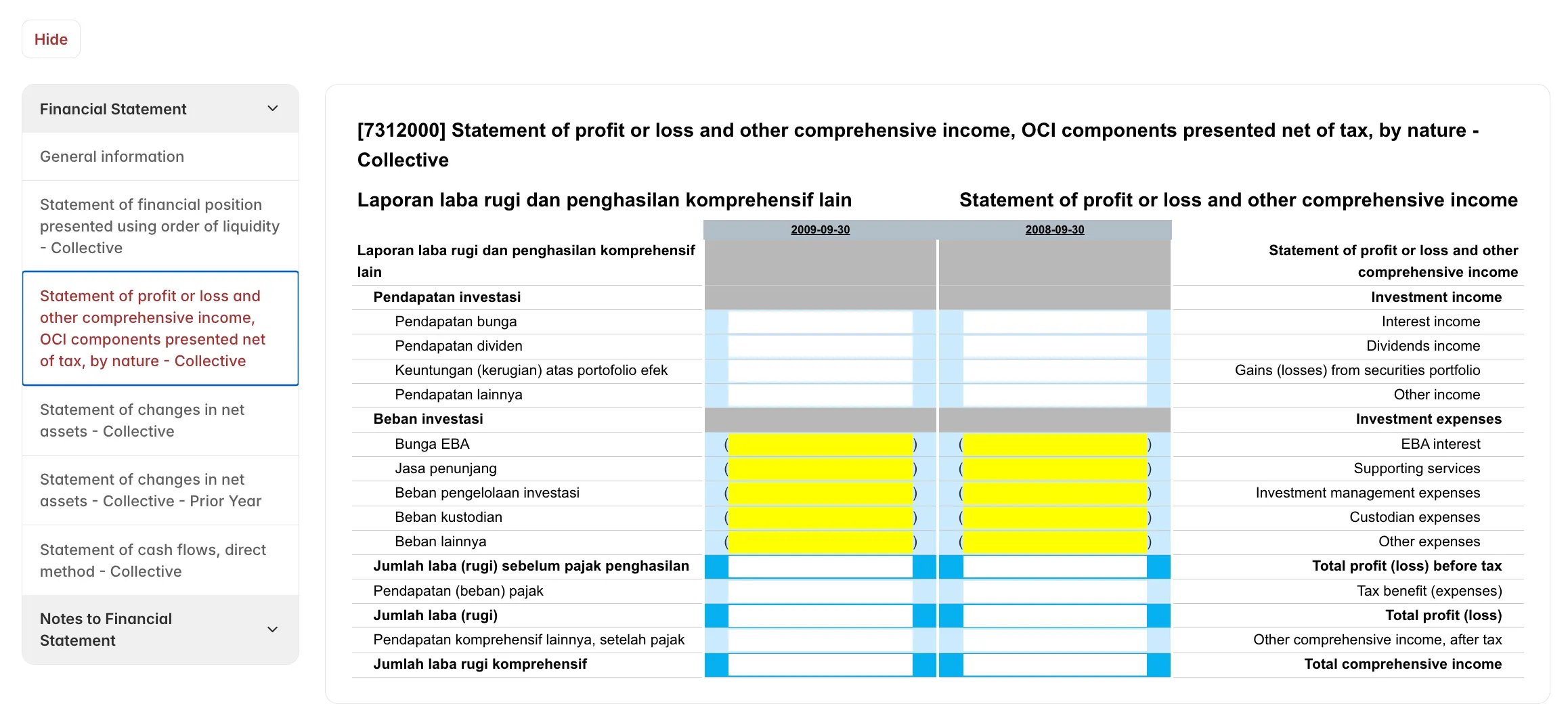
That works for display. The hard part is preserving what the user types when they switch between form tabs. The browser DOM is live — when a user types into a field, the .value property updates, but the value attribute in the underlying HTML does not. A naive re-injection on tab switch would wipe everything they had entered.
The solution was a custom XMLRenderer component that deliberately steps outside React’s rendering model. On blur or Enter, it serializes the current form state: cloning the DOM node, walking every tagged input, textarea, and select, syncing the live .value back to the HTML attribute, then re-encoding the whole thing to base64. That updated base64 is stored in React state, so switching tabs and returning restores exactly what the user had entered. A didMountRef guard prevents re-injection unless the base64 has actually changed, protecting user input from being wiped by unrelated re-renders.
// Serialize live DOM state back to HTML
const serialize = React.useCallback(() => {
  const src = containerRef.current;
  if (!src) return "";

  const copy = src.cloneNode(true) as HTMLElement;

  copy
    .querySelectorAll<HTMLInputElement | HTMLTextAreaElement | HTMLSelectElement>("[data-ser-key]")
    .forEach((c) => {
      const key = c.getAttribute("data-ser-key")!;
      const live = src.querySelector<typeof c>(`[data-ser-key="${key}"]`)!;
      if (!live) return;

      if (live.tagName === "INPUT") {
        const t = live.type.toLowerCase();
        if (t === "checkbox" || t === "radio") {
          (live as HTMLInputElement).checked
            ? c.setAttribute("checked", "checked")
            : c.removeAttribute("checked");
        } else {
          c.setAttribute("value", live.value);
        }
      } else if (live.tagName === "TEXTAREA") {
        c.textContent = live.value;
      } else if (live.tagName === "SELECT") {
        Array.from((live as HTMLSelectElement).options).forEach((opt, j) => {
          const cOpt = (c as HTMLSelectElement).options[j];
          if (cOpt)
            opt.selected
              ? cOpt.setAttribute("selected", "selected")
              : cOpt.removeAttribute("selected");
        });
      }
    });

  return copy.innerHTML;
}, []);

// Save on blur or Enter — re-encode to base64 and push to React state
React.useEffect(() => {
  const node = containerRef.current;
  if (!node) return;

  const save = () => onChange?.(btoa(serialize()));

  node.addEventListener("blur", save, true);
  node.addEventListener("keydown", (e) => {
    if (e.key === "Enter") save();
  });

  return () => {
    node.removeEventListener("blur", save, true);
    node.removeEventListener("keydown", save);
  };
}, [serialize, onChange, editable]);
Three Modules, One Entity
The trickiest architectural call was how to share data across the three modules. The same XBRL submission is viewed and acted on by three different types of users — the issuer (emiten-xbrl-reporting), the internal reporting team (xbrl-reporting), and the management oversight team (xbrl-management) — each with different permissions and different available actions, but all looking at the same underlying data.
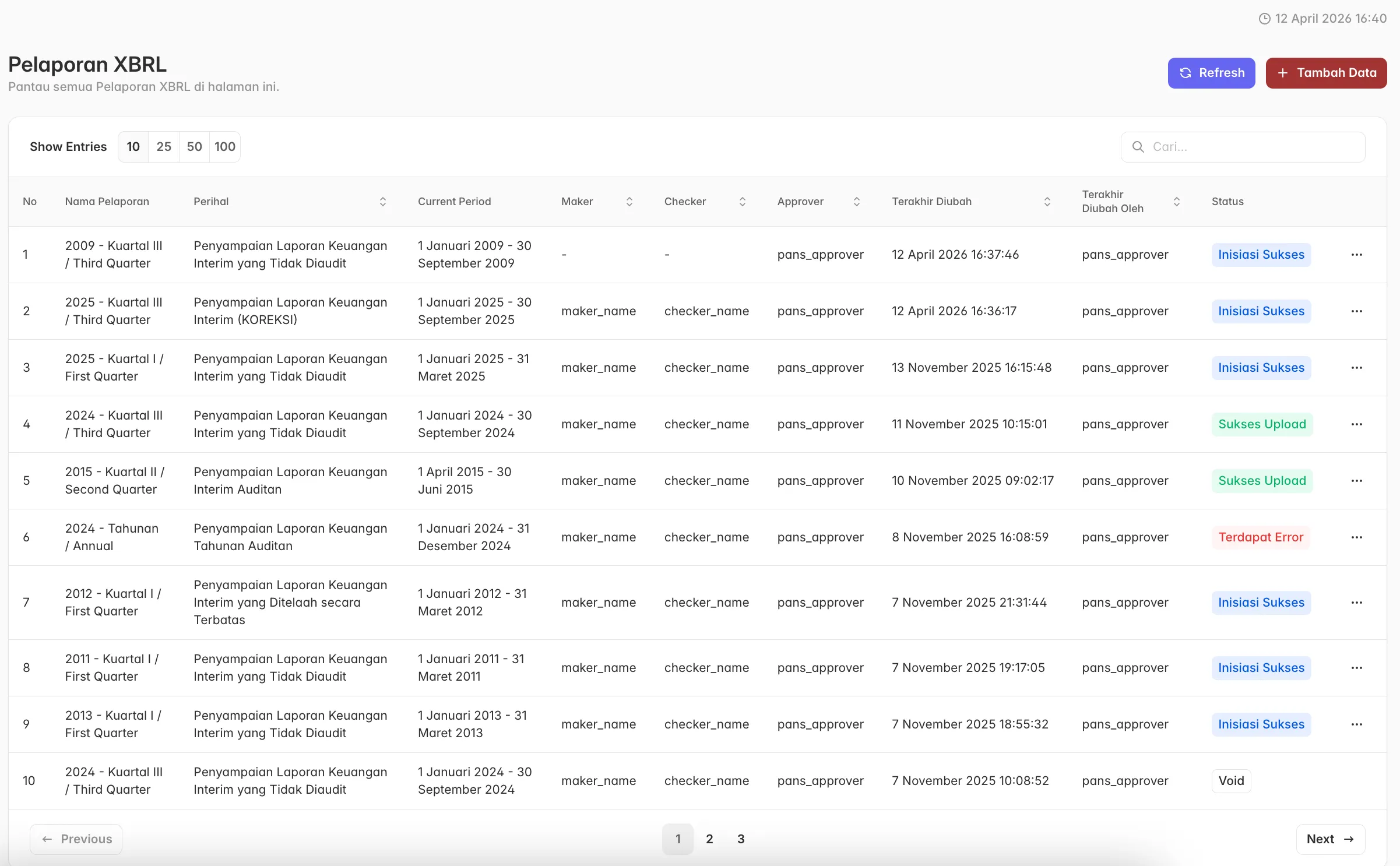
The tempting approach is to build three separate things. The right approach is to build the data layer once and vary only what needs to vary. I defined the shared types and schemas at the core, used role-based permission flags to control what each module could render and do, and structured the TanStack Query cache so that an action taken in one module — a status change, for instance — propagated correctly across the others without stale data creeping in.
xbrl-reporting was the hardest and was built first. Once the data contract, the workflow logic, and the form architecture were solid, xbrl-management and emiten-xbrl-reporting were largely a matter of applying the same foundation through a different lens. Both came together significantly faster as a result.
The Result
The module was delivered in five days — two days ahead of the one-week deadline I had been given. Those two days didn’t go to waste; they became a buffer for the issues that came up before UAT, most of them minor. UAT itself surfaced a handful of small findings, all resolved before sign-off. The PM’s reaction afterwards — I was, as he put it, actually a magician; without the rewrite landing on time, the client would have hit us with a missed-deadline penalty.
By the numbers, it isn’t a complicated story: a vendor spent three months and didn’t deliver. I spent five days and did. But the more honest version is that the speed was only possible because of the order in which things were done — getting the data contract right first, keeping the logic centralised, and not cutting corners on structure even under time pressure. A rushed rewrite that skipped those things would have produced a different result, and would have made for a much less fun magic trick.
Lesson Learned
1. The DOM can be managed outside React. Carefully.
The XML form rendering was my first encounter with base64-encoded HTML that needed to be injected, edited, and serialized back. It meant deliberately stepping outside React’s rendering model and managing state at the DOM level. Uncomfortable at first, but working through it gave me a pattern I can reach for again when the problem calls for it.
2. Readable code is documentation.
The single biggest tax on my time during the damage assessment wasn’t the bugs, it was trying to understand what the code was supposed to do before I could fix anything. No written documentation existed, and the code didn’t make up for it. I came away with a much stronger conviction that clarity in code isn’t just nice to have. For anyone inheriting it later — including the future version of myself — it is the documentation.